How to adjust AMD GPU power consumption on Linux
If you have a PC running Linux with an AMD GPU, you can change your GPU performance level. By default, the AMDGPU driver uses the “auto” performance level. But if you don’t need high performance, you can set it to “low” to reduce power consumption, heat generation, and fan noise.
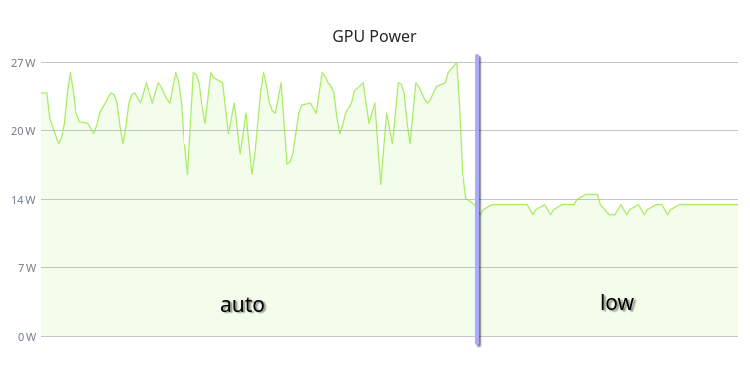
On my system, this change reduced the GPU power consumption from 30W to 15W in idle state and completely eliminated fan spinning.
You can check the current performance level with:
rocm-smi --showperflevel
rocm-smi --showprofile
# or
cat /sys/class/drm/card0/device/power_dpm_force_performance_level
cat /sys/class/drm/card0/device/pp_power_profile_mode
You can change the performance level on the fly with (low - minimum performance; auto - maximum performance):
rocm-smi --setperflevel "low"
# or
echo "low" | sudo tee /sys/class/drm/card0/device/power_dpm_force_performance_level
Or, you can change the power profile mode (2 - POWER_SAVING; 5 - COMPUTE):
rocm-smi --setprofile "POWER SAVING"
# or
echo 2 | sudo tee /sys/class/drm/card0/device/pp_power_profile_mode
Additionally, you can limit the maximum power consumption (210W in this example, down from the 300W default):
echo 210000000 | sudo tee /sys/class/drm/card0/device/hwmon/hwmon*/power1_cap
To make this change permanent, create a udev rule:
cat << EOF | sudo tee /etc/udev/rules.d/30-amdgpu-power.rules
ACTION=="add|change", SUBSYSTEM=="pci", DRIVER=="amdgpu", ATTR{power_dpm_force_performance_level}="low"
ACTION=="add|change", SUBSYSTEM=="pci", DRIVER=="amdgpu", ATTR{pp_power_profile_mode}="2"
ACTION=="add|change", SUBSYSTEM=="hwmon", ATTR{name}=="amdgpu", ATTR{power1_cap}="210000000"
EOF
# apply and verify
sudo udevadm control --reload-rules
sudo udevadm trigger --subsystem-match=pci --subsystem-match=hwmon
After that, the AMD GPU will use the “low” performance level at each boot.
By the way, you can also change your CPU performance profile with the command:
powerprofilesctl set power-saver
Supported options: power-saver, balanced, performance.
Comments