LLM performance on AMD Radeon AI PRO R9700
Recently, I acquired an AMD Radeon AI PRO R9700 to enhance my machine learning and development setup. It is a powerful GPU designed for professional workloads, including machine learning and AI applications. In this post, we explore the performance of large language models (LLMs) on the R9700, highlighting its capabilities and benchmarks.
Hardware
The PC used for testing is equipped with the following specifications:
- Motherboard: B550 AORUS ELITE AX V2
- GPU: AMD Radeon AI PRO R9700 (32 GB VRAM, RDNA 4)
- CPU: AMD Ryzen 9 5950X (16 cores / 32 threads)
- RAM: 64 GB DDR4-2666
- Storage: NVMe Samsung SSD 970 EVO Plus 1TB (x2)
Setup environment
For testing LLM performance I installed Ollama natively with AMD ROCm support, rather than running it in a container. The setup has three parts: the AMD GPU driver with the ROCm runtime, the Ollama server itself, and a few environment variables to tune memory and parallelism.
Install the AMD driver and ROCm
First, make sure the AMD GPU driver and the ROCm runtime are installed. The exact steps depend on your distribution; the ROCm installation guide walks through adding AMD’s package repository and installing the driver plus runtime.
Verify the driver and ROCm are loaded:
rocminfo
Install Ollama
Install Ollama with the official script:
curl -fsSL https://ollama.com/install.sh | sh
This registers an ollama systemd service and starts the server.
Configure the environment
The environment variables that tune memory and parallelism are set on the ollama systemd service. Edit the service with:
sudo systemctl edit ollama
and add:
[Service]
Environment="OLLAMA_CONTEXT_LENGTH=131072"
Environment="OLLAMA_KV_CACHE_TYPE=q8_0"
Environment="OLLAMA_FLASH_ATTENTION=1"
Environment="OLLAMA_MAX_LOADED_MODELS=1"
Environment="OLLAMA_NUM_PARALLEL=1"
Then reload and restart the service:
sudo systemctl daemon-reload
sudo systemctl restart ollama
Confirm the GPU is being used:
ollama ps
Benchmark results
I used the following prompt for testing text generation performance:
Tell me a story about a brave knight who saves a village from a dragon.
For vision models that understand images, I used this image with the following prompt:
What is in this picture?
AMD Radeon AI PRO R9700 (32 GB VRAM, RDNA 4)
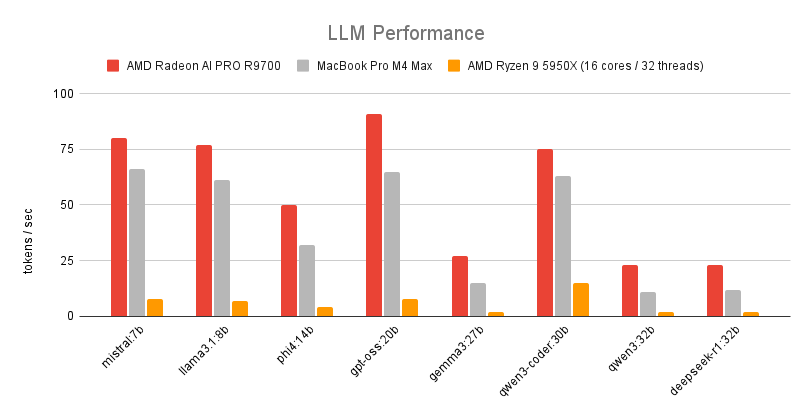
Here are the benchmark results for models with text generation only:
| Model | VRAM usage | Prompt | Response |
|---|---|---|---|
| mistral:7b | 6 GB | 414 tokens/sec | 80 tokens/sec |
| llama3.1:8b | 7 GB | 386 tokens/sec | 77 tokens/sec |
| phi4:14b | 12 GB | 213 tokens/sec | 50 tokens/sec |
| gpt-oss:20b | 13 GB | 704 tokens/sec | 91 tokens/sec |
| gemma3:27b | 19 GB | 207 tokens/sec | 27 tokens/sec |
| qwen3-coder:30b | 18 GB | 250 tokens/sec | 75 tokens/sec |
| qwen3:32b | 21 GB | 179 tokens/sec | 23 tokens/sec |
| deepseek-r1:32b | 22 GB | 99 tokens/sec | 23 tokens/sec |
For vision models that understand images, here are the results:
| Model | VRAM usage | Prompt | Response |
|---|---|---|---|
| moondream:1.8b | 3 GB | 2156 tokens/sec | 188 tokens/sec |
| gemma3:4b | 5 GB | 1316 tokens/sec | 107 tokens/sec |
| gemma3n:e4b | 8 GB | 367 tokens/sec | 58 tokens/sec |
| llava:7b | 6 GB | 515 tokens/sec | 83 tokens/sec |
| qwen3-vl:8b | 11 GB | 423 tokens/sec | 73 tokens/sec |
| gemma3:27b | 19 GB | 171 tokens/sec | 27 tokens/sec |
| qwen3-vl:32b | 26 GB | 132 tokens/sec | 24 tokens/sec |
| llava:34b | 22 GB | 129 tokens/sec | 24 tokens/sec |
MacBook Pro M4 Max (36 GB RAM, 14 cores)
Here are the benchmark results for models with text generation only:
| Model | Prompt | Response |
|---|---|---|
| mistral:7b | 208 tokens/sec | 66 tokens/sec |
| llama3.1:8b | 219 tokens/sec | 61 tokens/sec |
| phi4:14b | 91 tokens/sec | 32 tokens/sec |
| gpt-oss:20b | 62 tokens/sec | 65 tokens/sec |
| gemma3:27b | 11 tokens/sec | 15 tokens/sec |
| qwen3-coder:30b | 88 tokens/sec | 63 tokens/sec |
| qwen3:32b | 57 tokens/sec | 11 tokens/sec |
| deepseek-r1:32b | 48 tokens/sec | 12 tokens/sec |
For vision models that understand images, here are the results:
| Model | Prompt | Response |
|---|---|---|
| moondream:1.8b | 1706 tokens/sec | 180 tokens/sec |
| gemma3:4b | 995 tokens/sec | 81 tokens/sec |
| gemma3n:e4b | 39 tokens/sec | 46 tokens/sec |
| llava:7b | 640 tokens/sec | 65 tokens/sec |
| qwen3-vl:8b | 246 tokens/sec | 56 tokens/sec |
| gemma3:27b | 183 tokens/sec | 18 tokens/sec |
| qwen3-vl:32b | 76 tokens/sec | 15 tokens/sec |
| llava:34b | 143 tokens/sec | 16 tokens/sec |
AMD Ryzen 9 5950X (16 cores/32 threads)
This is the CPU-only performance without GPU acceleration.
Here are the benchmark results for models with text generation only:
| Model | Prompt | Response |
|---|---|---|
| mistral:7b | 61 tokens/sec | 8 tokens/sec |
| llama3.1:8b | 62 tokens/sec | 7 tokens/sec |
| phi4:14b | 32 tokens/sec | 4 tokens/sec |
| gpt-oss:20b | 94 tokens/sec | 8 tokens/sec |
| gemma3:27b | 18 tokens/sec | 2 tokens/sec |
| qwen3-coder:30b | 79 tokens/sec | 15 tokens/sec |
| qwen3:32b | 15 tokens/sec | 2 tokens/sec |
| deepseek-r1:32b | 14 tokens/sec | 2 tokens/sec |
For vision models that understand images, here are the results:
| Model | Prompt | Response |
|---|---|---|
| moondream:1.8b | 293 tokens/sec | 27 tokens/sec |
| gemma3:4b | 63 tokens/sec | 7 tokens/sec |
| gemma3n:e4b | 82 tokens/sec | 10 tokens/sec |
| llava:7b | 65 tokens/sec | 8 tokens/sec |
| qwen3-vl:8b | 26 tokens/sec | 6 tokens/sec |
| gemma3:27b | 18 tokens/sec | 2 tokens/sec |
| qwen3-vl:32b | 10 tokens/sec | 1 tokens/sec |
| llava:34b | 14 tokens/sec | 2 tokens/sec |
Conclusion
The AMD Radeon AI PRO R9700 demonstrates strong performance across a variety of large language models, handling both text-only and vision-capable models effectively. With its substantial VRAM and robust architecture, the R9700 is well-suited for professional AI workloads, making it a compelling choice for developers and researchers working with LLMs. Now, I can take full advantage of AMD’s capabilities for my AI projects and code with local LLMs.
Comments